
The Anbessa Bet login runs on two things: a phone number and a password. There is no e-mail field on the sign-up form and no promo-code box, so opening an account takes about a minute. The logo on the site reads Ambessa, which is the same operator.
This page walks through registration, the first login, what the account menu holds and what to do when a login fails. Facts here come from the live forms, checked on 24/11/2026. Anything the site does not show without an account is marked as unconfirmed rather than guessed.
Phone number + password · 18+
Who can open an account
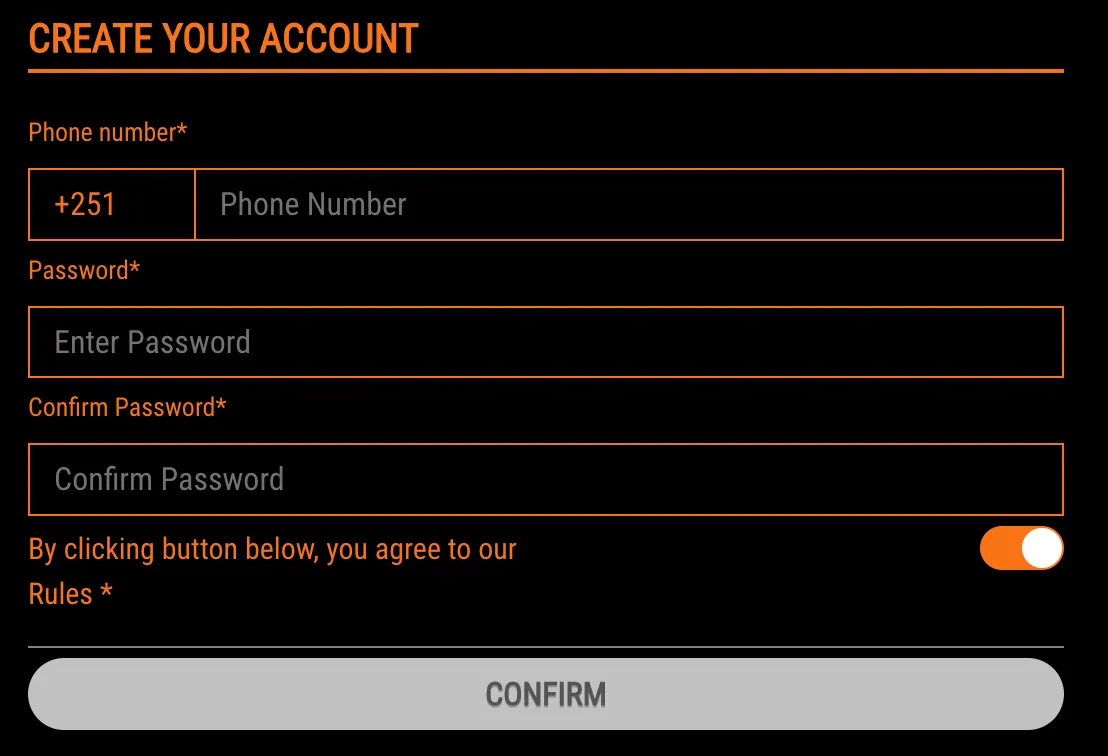
Registration is built around an Ethiopian mobile number: the field comes with the +251 prefix already filled in. The form also carries an agreement checkbox, which is where you accept the rules and confirm you are an adult. The legal age for betting is 18+.
Use your own number. An account tied to somebody else's SIM is a problem waiting to happen the day you want to withdraw. Keep to one account per person; bookmakers routinely block duplicates, and the balance on a blocked account is hard to recover.
Registration options
The signup page at ambessabet.com/en/auth/signup offers a single route. The table shows what was visible and what was not.
| Method | Data required | Confirmation |
|---|---|---|
| Phone number | Number with +251 prefix, password, password repeated | Agreement checkbox, then the CONFIRM button |
| Not offered on the form | - | |
| Social network or Telegram bot | Not offered on the form | - |
| Promo code | No field seen | - |
One route has a practical upside: there is nothing extra to forget later. Your phone number is your login name.
How to register on Anbessa Bet, step by step
Create an account with your phone number
Open the Register form
Go to the site in a mobile or desktop browser and press Register in the header. The signup page opens with the phone field on top.
Enter your phone number
The +251 prefix is already there. Type the rest of your Ethiopian mobile number without repeating the prefix.
Set a password
Choose a password you do not use anywhere else. Longer is better; mix letters and digits.
Confirm the password
Type the same password again. A typo here is the most common reason a first login fails later, so read it twice.
Tick the agreement
The checkbox covers the terms and your age. Without it the form will not go through.
Press CONFIRM
The account is created. From here you can log in with the same number and password.
Logging in
The login form at ambessabet.com/en/auth/login asks for the phone number and the password from registration. Nothing else is requested on screen. No two-factor step and no "remember me" option were visible on the form.
- Press Login in the header.
- Enter the number you registered with.
- Enter the password and confirm.
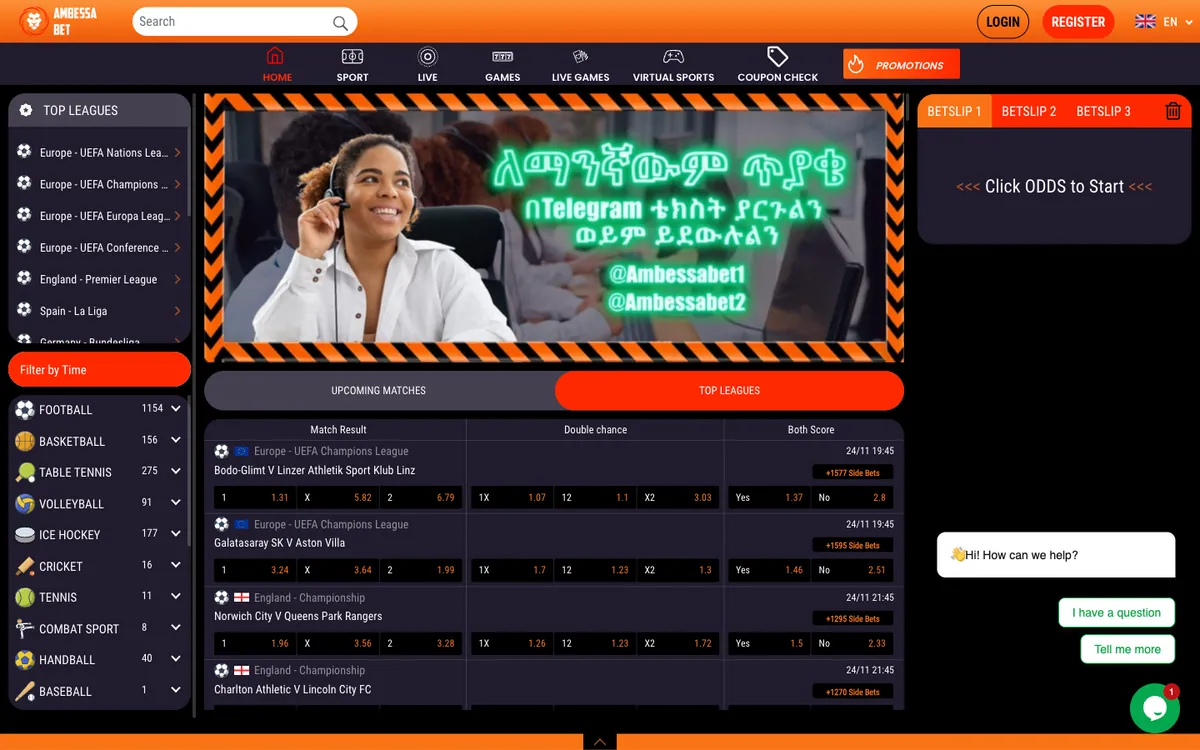
Once you are in, the header switches to the account menu. On a shared phone, press Sign out when you finish, because a browser can keep the session open.
What the account menu holds
After login the menu lists seven items. Their contents sit behind the login, so the table describes only what each name implies.
| Menu item | What it is for |
|---|---|
| Deposit | Adding money to the balance |
| Withdraw | Requesting a payout |
| Transaction History | The list of deposits and withdrawals |
| Bets History | Placed bets and their outcomes |
| Check Ticket | Looking up a bet slip |
| Profile | Your account details |
| Sign out | Ending the session |
How to make a deposit
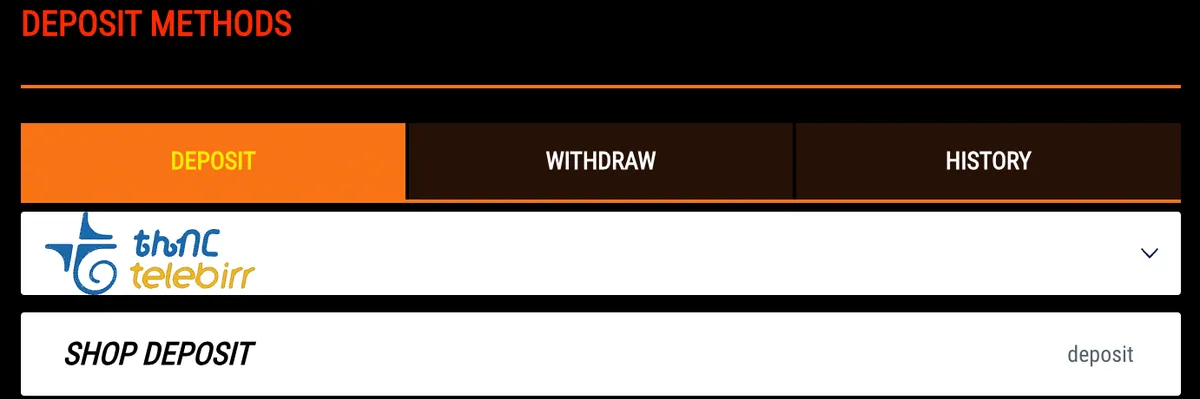
The cashier opens from the account menu after login. Its screen has three tabs: Deposit, Withdraw and History. Under Deposit there are two options, Telebirr and Shop Deposit.
- Log in and choose Deposit in the account menu.
- Pick Telebirr or Shop Deposit.
- Read the instructions and limits on screen before you send any money.
The screen above does not show minimum amounts or fees, so check them for the option you pick. Bets History is also a handy mirror: a quick scroll shows how much you actually placed this week.
Login from a phone
Most players in Ethiopia come in from a mobile browser, and the forms fit a narrow screen: the phone field takes your number, the keyboard switches to digits, and the buttons are large enough for a thumb. Open the site in Chrome or another browser, tap Login, and sign in as usual. Bookmark the page to skip typing the address.
Prefer an icon on the home screen? The anbessa bet app download page explains how the Android file is installed, and the same number and password work there.
Login problems and quick fixes
| Problem | What to check |
|---|---|
| "Wrong number or password" | The prefix is typed twice, or a leading zero is added after +251. |
| Password rejected | Caps Lock, a keyboard layout switched to Amharic, or a space copied with the password. |
| Page will not load | Weak mobile signal. Switch between Wi-Fi and mobile data and reload. |
| Old page after an update | Clear the browser cache or open the site in a private tab. |
| Forgot the password | No reset link was visible on the login form. Write to support on Telegram. |
Support runs through Telegram: Support 1 and Support 2, plus a channel for news. Phone and e-mail contacts were not found. Never send your password to anyone in a chat, support included; they do not need it.
Verification (KYC)
The reference site does not publish verification rules: no document list, no deadline, no trigger such as a first withdrawal. It would be wrong to promise any of these. What helps in practice is registering with your real number and details from the start, so that any check later finds everything matching.
Before you press Register: a short checklist
| Item | Why it matters |
|---|---|
| Active Ethiopian SIM | The phone number is the only login name on the form, so the SIM must stay in your hands. |
| A password saved safely | No reset link was visible on the login form, so a lost password means a chat with support. |
| Stable connection | The site is a single-page app; a dropped signal in the middle of the form can leave it half-filled. |
| Age 18+ | The agreement checkbox covers the terms and your age. |
| Language | The header offers English, Amharic and Afaan Oromo; pick one before you start so the labels are familiar. |
After the first login
A new account starts empty. The header changes to the account menu, and the main menu stays the same: Home, Sport, Live, Games, Live Games, Virtual Sports, Coupon Check and Promotions. A sensible first round looks like this:
- Open Profile and check that the details match you.
- Look at Deposit to see which methods and limits are offered before you send anything.
- Open Promotions. On 24/11/2026 the page loaded empty, so no welcome offer terms could be confirmed; do not count on one until you see the conditions in writing.
- Place a small first bet and then open Bets History and Check Ticket to see how a slip is recorded.
Common mistakes at registration
- Typing the prefix twice. The +251 is pre-filled, so enter only the remaining digits of your number.
- Two different passwords. The form asks you to repeat the password; if the fields differ, the form will not go through.
- Skipping the checkbox. The CONFIRM button works only after the agreement is ticked.
- Using a friend's number. Winnings and support requests are tied to the number on the account, so a borrowed SIM creates problems later.
- Opening a second account. One person, one account; extra ones can be blocked together with their balance.
Managing the account
Profile is the place for personal data. Whether a phone number can be changed from there, and how an account is closed or deleted, is not published openly. For those requests, message Telegram support from the number tied to the account, so they can recognise you.
Self-exclusion works the same way. If betting stops being fun, ask support to block the account and stay away from the login page in the meantime.
Keeping the account safe
Simple security habits
Unique password
Do not reuse the one from your e-mail or mobile money wallet.
Codes stay private
Nobody from the site needs your password or any code sent to your phone.
Guard the SIM
The number is the login. Lock the phone and report a lost SIM quickly.
Sign out
Use Sign out on shared or borrowed devices.
Check the address
Type the domain yourself or use a bookmark; links from strangers can lead to copies.
18+
Betting is for adults only. Set a budget before the first deposit and stop when it is spent.
Frequently asked questions
What do I need for the Anbessa Bet login?
Your phone number (with the +251 prefix) and the password you set at registration. The login form asks for nothing else.
How do I register on Anbessa Bet?
Press Register, enter your phone number, set and repeat a password, tick the agreement checkbox and press CONFIRM.
Can I sign up with an e-mail address?
The signup form checked on 24/11/2026 has no e-mail field. Registration is by phone number and password.
What is the minimum age to register?
18+. The agreement checkbox on the form covers the terms and your age.
I forgot my password. What now?
No password-reset link was visible on the login form. Contact support on Telegram from the number tied to the account and do not share the password itself.
Is there a promo-code field when signing up?
No promo-code field was seen on the registration form.
Can I use the same login in the app?
Yes, the account is the same: use the phone number and password you registered with.
Is identity verification required?
The site does not publish verification rules, so nothing is confirmed. Register with your real details and ask support if a check is requested.